
Cherry Studio
- Homepage: cherry-ai.com
- Docs: docs.cherry-ai.com
- Model service config: Provider settings / Custom provider
- GitHub: github.com/CherryHQ/cherry-studio
- Protocol: OpenAI-compatible / Anthropic Messages / Gemini (selected by provider type, can coexist in the same app)
Install
Cherry Studio is a desktop client supporting Windows, macOS, and Linux. Grab the installer for your platform from the download page; always defer to the official source:
- macOS:
.dmg(separate Intel / Apple Silicon builds) - Windows:
.exeinstaller or portable.zip - Linux:
.AppImage/.deb/.rpm
You can also pin a specific version on GitHub Releases.
After installing, open the app and check the current version under Settings → About Us; when you hit issues, upgrading to the latest version is the recommended first step.
Connect TokenBay
How it works
Cherry Studio is a GUI client that does not use environment variables — all gateway config happens in the Settings → Model Services panel: add a “custom provider”, choose its provider type (which decides the protocol), and fill in the API host (Base URL) and API key. Credentials are sent with each request via the Authorization / x-api-key header, handled automatically by Cherry Studio.
A single TokenBay key works across all three protocols at once, so add multiple providers as needed:
- OpenAI (recommended starting point): covers all text models (GPT, Claude, Gemini, DeepSeek, GLM, Qwen, etc. can all be called via the OpenAI-compatible protocol).
- Anthropic: uses the native Anthropic Messages protocol, ideal for the Claude family and models that support it, with the most complete feature set (prompt caching, etc.).
- Gemini: uses the native Gemini protocol, ideal for the
gemini-*series.
Base URL concatenation rule (must read): Cherry Studio automatically appends the protocol-specific path to the host you enter (OpenAI→
/v1/chat/completions, Anthropic→/v1/messages, Gemini→/v1beta/...).
- So enter only the root domain
https://api.tokenbay.comas the API host (no/v1, no trailing slash, no specific endpoint).- If you enter a full path and want it used as-is without appending, the host must end with
#(official convention). Normally the root domain is all you need — this form isn’t required.
1. Get an API key
Sign in to the TokenBay console → API Keys → Create Key. Copy the full string starting with sk-. The plaintext is shown only once — you can’t view it again after leaving the page.
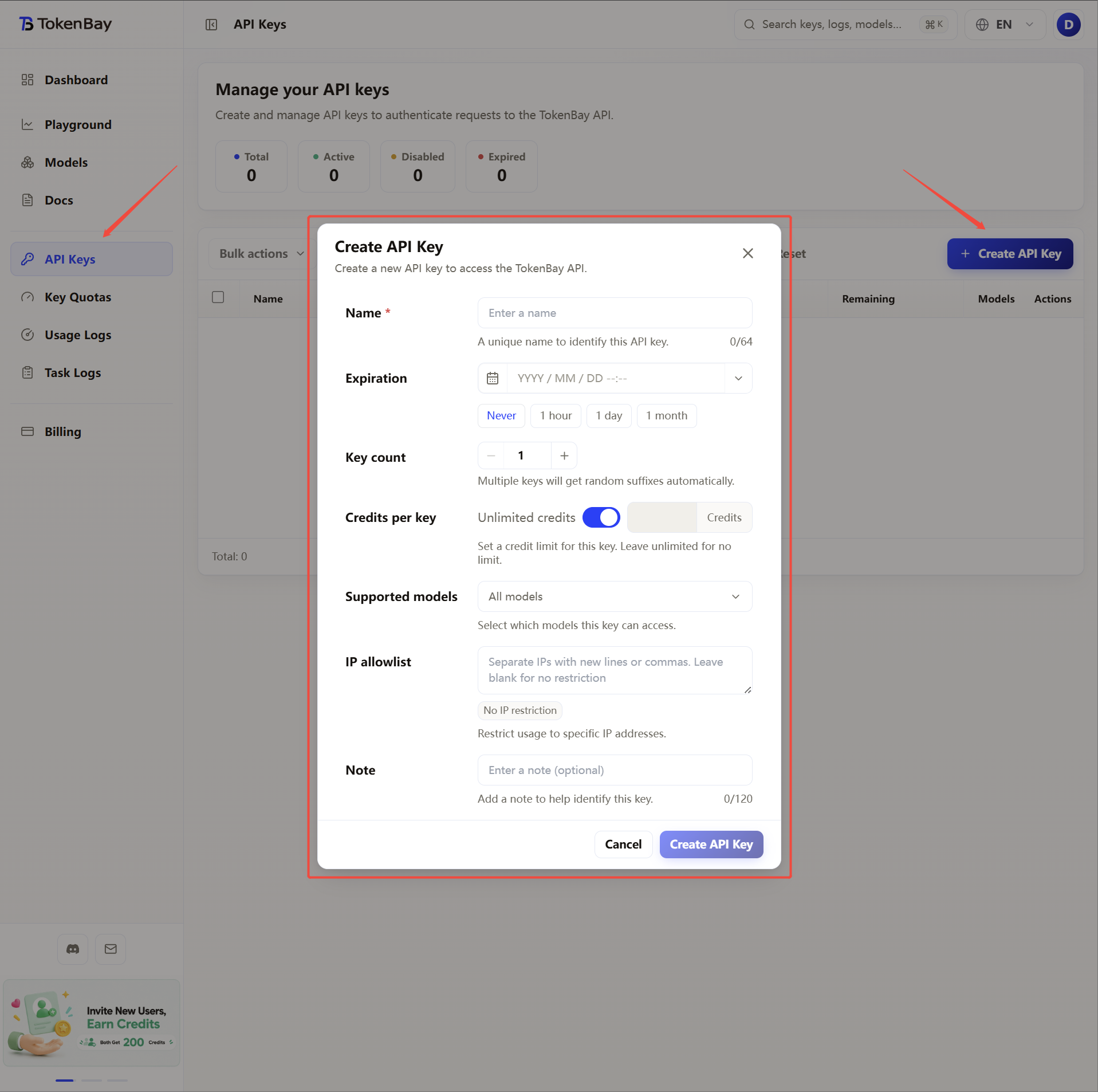
2. Add an OpenAI-compatible service (recommended starting point)
Go to Settings (gear icon, bottom-left) → Model Services, click + Add below the list, and in the dialog:
| Field | Value |
|---|---|
| Provider name | TokenBay (OpenAI) (custom, for easy identification) |
| Provider type | OpenAI |
After clicking Add, fill in the following on the provider detail page:
| Field | Value |
|---|---|
| API key | Your TokenBay API key (sk-...) |
| API host | https://api.tokenbay.com |
Then:
- Click the Check button to the right of the API key field to verify connectivity (it tests using the last chat model in the model list, so add models first).
- Under Manage / Add, add the model IDs you want to use (see recommended models below) by clicking the + to the right of each model to add it to the model list.
- Be sure to turn on the enable toggle in the top-right corner, otherwise the provider won’t take effect and its models won’t appear in the model selector.
3. (Optional) Add an Anthropic service
When you want the Claude family to use the native Anthropic protocol (more complete features), add another set following step 2:
| Field | Value |
|---|---|
| Provider name | TokenBay (Claude) |
| Provider type | Anthropic |
| API key | The same TokenBay key |
| API host | https://api.tokenbay.com |
Cherry Studio appends /v1/messages itself — do not add the path manually.
4. (Optional) Add a Gemini service
When you want gemini-* to use the native Gemini protocol:
| Field | Value |
|---|---|
| Provider name | TokenBay (Gemini) |
| Provider type | Gemini |
| API key | The same TokenBay key |
| API host | https://api.tokenbay.com |
Cherry Studio appends the /v1beta/... path automatically — again, enter only the root domain.
5. Recommended models
| Use case | Model ID | Provider |
|---|---|---|
| General flagship | gpt-5.5 | TokenBay (OpenAI) |
| Main coding | claude-sonnet-4.6 | TokenBay (Claude / OpenAI) |
| Complex refactor / long context | claude-opus-4.8 | TokenBay (Claude / OpenAI) |
| Lightweight / fast response | claude-haiku-4.5 | TokenBay (Claude / OpenAI) |
| Coding alternative (OpenAI) | gpt-5.3-codex | TokenBay (OpenAI) |
| Multimodal / vision | gemini-3.1-pro-preview | TokenBay (Gemini / OpenAI) |
Model IDs are passed through to the upstream directly, with no prefix. For the full available list, see Models or the console Models page.
Model name format: in TokenBay model names, version numbers only accept the dot form (e.g.
claude-sonnet-4.6,gpt-5.5) — don’t write them with hyphens (claude-sonnet-4-6,gpt-5-5).The table above is illustrative; before connecting, verify the exact Model ID in the console and confirm the group your API key belongs to has been authorized for that model (models not enabled must be authorized in the console group settings).
6. Advanced config (multi-key / streaming / long tasks)
- Multi-key rotation: a single provider supports multiple keys — enter them in the API key field separated by commas (e.g.
sk-xxx1,sk-xxx2), and Cherry Studio cycles through them in order. - Streaming responses: on by default, and TokenBay speaks standard SSE. If long tasks stutter or truncate, turn streaming off in the provider or chat settings and re-test to isolate whether it’s a network or protocol issue.
- Long-task timeouts: long-context / agent tasks take a while; if they get interrupted, first use
curlto check connectivity and proxy toapi.tokenbay.com, then confirm the upstream model’s concurrency / rate limits.