
Cline
- Homepage: cline.bot
- Install docs: docs.cline.bot/getting-started/installing-cline
- Gateway config: Anthropic provider / OpenAI Compatible provider
- Protocol: Anthropic Messages (recommended, for Claude) / OpenAI-compatible (for GPT and other models)
Install
Cline is an IDE extension, officially supporting VS Code, Cursor, Windsurf, VSCodium, Antigravity, and the JetBrains IDE family. Always defer to the official install docs.
VS Code / Cursor / Windsurf / VSCodium / Antigravity
Press Ctrl/Cmd + Shift + X to open the Extensions panel, search for Cline, and install. You can also install directly by Marketplace ID (Cline was formerly named Claude Dev, so the extension ID is still saoudrizwan.claude-dev):
code --install-extension saoudrizwan.claude-devJetBrains (IDEA / PyCharm / GoLand, etc.)
Go to Settings → Plugins → Marketplace, search for Cline, install, then restart the IDE; you can also install it from the JetBrains Marketplace page.
After installation, a Cline icon appears in the VS Code activity bar on the left; you can check the installed Cline version in the Extensions panel, and upgrading to the latest version is the recommended first step when you hit issues.
Connect TokenBay
How it works
Cline doesn’t configure the gateway via environment variables — instead, you select a provider in the extension’s settings panel and fill in the endpoint and credentials. There are two providers for connecting to TokenBay:
- Anthropic provider (recommended): uses TokenBay’s native Anthropic endpoint with the most complete feature set (prompt caching, etc.). After checking Use custom base URL, Cline automatically appends
/v1/messagesto the base URL, so enter only the bare gateway host in Custom Base URL — do not include a path. - OpenAI Compatible provider (alternative): for non-Claude models like GPT and DeepSeek. It uses the standard
/chat/completions, so the Base URL must include/v1.
Don’t get the Base URL path wrong:
- The Anthropic provider’s Custom Base URL is
https://api.tokenbay.com(bare host, no/v1, no trailing slash).- The OpenAI Compatible provider’s Base URL is
https://api.tokenbay.com/v1(with/v1).
1. Get an API key
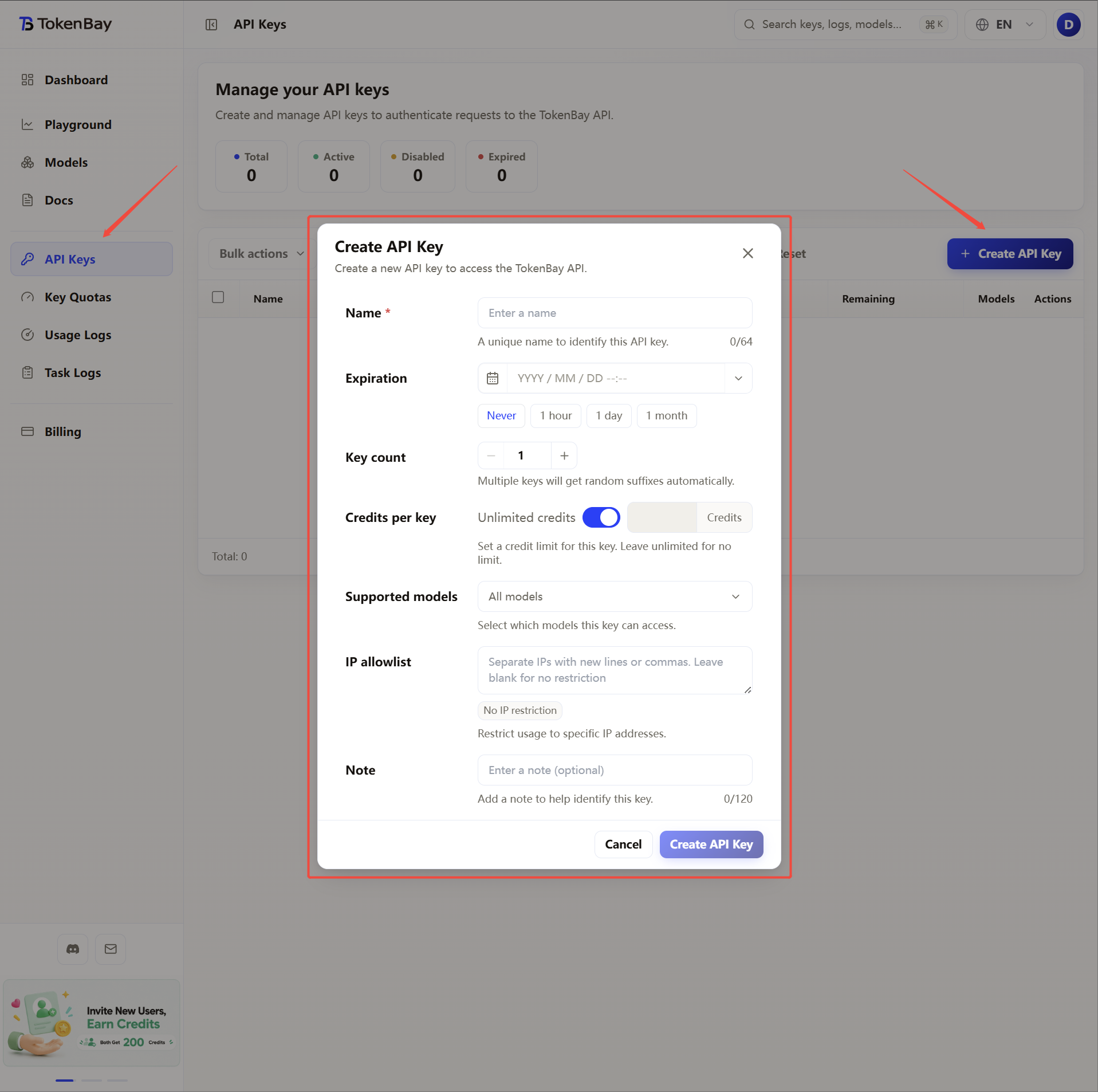
Sign in to the TokenBay console → API Keys → Create Key. Copy the full string starting with sk-. The plaintext is shown only once — you can’t view it again after leaving the page.
2. Configure the Anthropic provider (recommended)
Click the Cline icon on the left → settings icon (⚙️), and fill in the table below:
| Field | Value |
|---|---|
| API Provider | Anthropic |
| Anthropic API Key | Your TokenBay API key (sk-...) |
| Use custom base URL | Checked |
| Custom Base URL | https://api.tokenbay.com |
| Model | claude-sonnet-4.6 |
Saves take effect immediately, no restart needed.
3. Alternative: configure the OpenAI Compatible provider
When you need non-Claude models like GPT / DeepSeek, add a new provider:
| Field | Value |
|---|---|
| API Provider | OpenAI Compatible |
| Base URL | https://api.tokenbay.com/v1 |
| API Key | Your TokenBay API key (sk-...) |
| Model ID | gpt-5.3-codex (or any other available model) |
After filling it in, click Verify to check connectivity; once it passes you’re good to go.
4. Recommended models
| Use case | Model ID | Provider |
|---|---|---|
| Main coding | claude-sonnet-4.6 | Anthropic |
| Complex refactor / long context | claude-opus-4.8 | Anthropic |
| Lightweight / fast response | claude-haiku-4.5 | Anthropic |
| GPT coding alternative | gpt-5.3-codex | OpenAI Compatible |
| GPT general flagship | gpt-5.5 | OpenAI Compatible |
Model IDs are passed through to the upstream directly, with no prefix. For the full available list, see Models.
Model name format: in TokenBay model names, version numbers only accept the dot form (e.g.
claude-sonnet-4.6,gpt-5.4) — don’t write them with hyphens (claude-sonnet-4-6,gpt-5-4).The table above is illustrative; for the exact Model ID and endpoint, defer to the console Models page (or Models). Verify before connecting, and confirm the group your API key belongs to has been authorized for that model.
5. Advanced config (long tasks / proxy)
- Auto-approval limit: Cline’s tool calls have a default cap on auto-approval rounds. For complex tasks, raise Max Requests in the settings panel to reduce frequent manual confirmations.
- Network and timeouts: the VS Code version of Cline reuses VS Code’s own network/proxy settings. Behind a corporate network or firewall, configure
http.proxyin VS Code settings (see the official networking and proxies docs). Long-context tasks take a while; if requests get interrupted, first check whether a proxy or firewall is blockingapi.tokenbay.com. - Switching between configs: Cline supports saving multiple API Configuration Profiles — you can save “Anthropic + claude-sonnet-4.6” and “OpenAI Compatible + gpt-5.4” as two separate profiles and switch between them as needed.