
CodeBuddy
- Homepage: codebuddy.ai
- Install docs: codebuddy.ai/docs/zh/cli/installation
- Config reference: models.json guide / Environment variables
- Protocol: OpenAI-compatible
Install
CodeBuddy Code is a command-line coding assistant from Tencent Cloud, supporting macOS, Linux, and Windows. For all other methods, defer to the official install docs.
Package manager (requires Node.js 18.20+)
npm install -g @tencent-ai/codebuddy-codeYou can also use pnpm / yarn / bun:
pnpm add -g @tencent-ai/codebuddy-codeHomebrew (macOS / Linux)
brew install Tencent-CodeBuddy/tap/codebuddy-codeNative binary install script (Beta, no Node.js required)
macOS / Linux:
curl -fsSL https://www.codebuddy.cn/cli/install.sh | bashWindows (PowerShell):
irm https://www.codebuddy.cn/cli/install.ps1 | iexAfter installing, confirm with codebuddy --version. Config files are stored in the ~/.codebuddy/ directory by default.
Connect TokenBay
How it works
CodeBuddy Code connects to Tencent Cloud’s official service by default. To route through TokenBay, the official docs offer two paths:
- Custom model via models.json (recommended): register a custom model in
~/.codebuddy/models.json, where each model specifies its ownurl,apiKey, and capability flags. This is the most flexible option and lets you wire up multiple models at once. - Environment variable override: use
CODEBUDDY_BASE_URLandCODEBUDDY_API_KEYto globally override the default endpoint — suitable for the simple case of connecting a single upstream.
OpenAI format only: CodeBuddy’s custom models currently support the OpenAI protocol only, so connecting to TokenBay requires the OpenAI-compatible endpoint (with
/v1), not the bare Anthropic address.The models.json
urlmust be a full path: this field must be the full path of the API endpoint, typically ending in/chat/completions, e.g.https://api.tokenbay.com/v1/chat/completions. This differs from theCODEBUDDY_BASE_URLenvironment variable, which only takes the endpoint root.
1. Get an API key
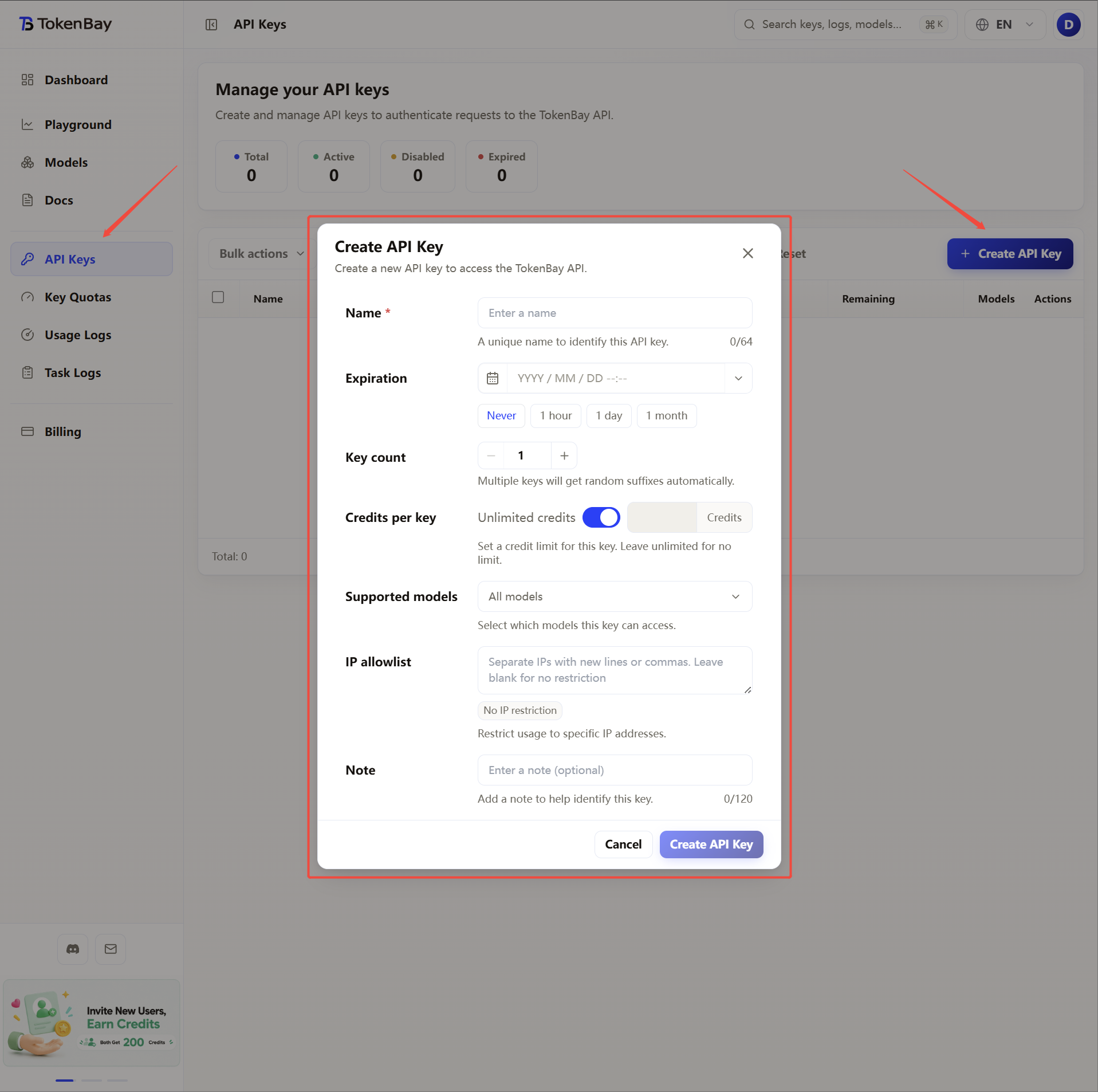
Sign in to the TokenBay console → API Keys → Create Key. Copy the full string starting with sk-. The plaintext is shown only once and cannot be viewed again after you leave the page.
2. Configure the environment variable
To avoid storing the key in plaintext in a config file, first put the API key in an environment variable; below we use TOKENBAY_API_KEY throughout:
| Variable | Value |
|---|---|
TOKENBAY_API_KEY | Your TokenBay API key (sk-...) |
macOS / Linux (zsh or bash)
Append the following line to ~/.zshrc or ~/.bashrc, then run source ~/.zshrc to apply it:
export TOKENBAY_API_KEY="sk-XXXXXXX"Windows (PowerShell, writes to the user-level environment)
[Environment]::SetEnvironmentVariable('TOKENBAY_API_KEY','sk-XXXXXXX','User')Windows (CMD)
setx TOKENBAY_API_KEY "sk-XXXXXXX"Both the PowerShell and CMD forms persist the user-level environment variable, and you need to open a new terminal window for it to be picked up.
3. Configure models.json (recommended)
Edit the user-level config ~/.codebuddy/models.json (create it if it doesn’t exist) to register a custom model. Both apiKey and url support the ${VAR_NAME} syntax to reference the environment variable from the previous step:
{
  "models": [
    {
      "id": "gpt-5.3-codex",
      "name": "GPT-5.3 Codex (TokenBay)",
      "vendor": "TokenBay",
      "apiKey": "${TOKENBAY_API_KEY}",
      "url": "https://api.tokenbay.com/v1/chat/completions",
      "maxInputTokens": 200000,
      "maxOutputTokens": 8192,
      "supportsToolCall": true
    }
  ],
  "availableModels": ["gpt-5.3-codex"]
}
Field reference:
| Field | Meaning |
|---|---|
id | Unique model identifier (required); must match the upstream Model ID |
name | Model display name |
vendor | Model vendor, used for display only |
apiKey | API key; supports the ${TOKENBAY_API_KEY} environment variable reference |
url | The full path of the API endpoint (must end in /chat/completions) |
maxInputTokens / maxOutputTokens | Maximum input / output token counts |
supportsToolCall | Whether the model supports tool calling |
availableModels | Controls which model IDs are shown in the dropdown (shows all if empty) |
models.json supports hot reload and takes effect automatically about 1 second after saving — no restart needed. Set the file permissions to
600, and do not commit a config containing a plaintext key to version control.
4. Alternative: global environment variable override
When connecting a single upstream, you can override the default endpoint directly with environment variables, without writing models.json:
| Variable | Value |
|---|---|
CODEBUDDY_BASE_URL | https://api.tokenbay.com/v1 |
CODEBUDDY_API_KEY | Your TokenBay API key (sk-...) |
CODEBUDDY_MODEL | The model ID used by default (e.g. gpt-5.3-codex) |
export CODEBUDDY_BASE_URL="https://api.tokenbay.com/v1"
export CODEBUDDY_API_KEY="sk-XXXXXXX"
export CODEBUDDY_MODEL="gpt-5.3-codex"
These variables can also be written into the
envfield of~/.codebuddy/settings.jsonto apply automatically to every session.
5. Recommended models
| Use case | Model ID |
|---|---|
| Primary coding | gpt-5.3-codex |
| General-purpose flagship / complex reasoning | gpt-5.5 |
| Best value | gpt-5.4-mini |
Model name format: In model names, version numbers are only accepted in dotted form (e.g.
gpt-5.4); do not write them with hyphens (gpt-5-4).CodeBuddy’s custom models support the OpenAI format only, so choose models under TokenBay’s OpenAI-protocol group. The table above is just an example. Refer to the Models list for the exact Model IDs and endpoints; before connecting, verify them and confirm your group is authorized for the model.
6. Verify the connection
Start codebuddy, select the model you configured in the model selector (models registered via models.json carry a custom tag), and send a message to confirm a normal reply. If you get an auth failure or a model error, first check:
- whether the
urlis written as a full path ending in/chat/completions; - whether the environment variable referenced by
${TOKENBAY_API_KEY}is set and you’ve opened a new terminal; - whether the model
idexactly matches the TokenBay upstream Model ID.