
Hermes Agent
- Homepage: hermes-agent.nousresearch.com
- Install docs: hermes-agent.nousresearch.com/docs/getting-started/installation
- Gateway configuration (AI Providers): hermes-agent.nousresearch.com/docs/integrations/providers
- Protocol: OpenAI Chat Completions (a custom endpoint uses
wire/api_mode = chat_completions)
Install
Hermes is a Python application, and the official installer handles all dependencies automatically (Python, Node.js, ripgrep, ffmpeg) while also cloning the repository, creating the virtual environment, and configuring the global hermes command. For anything else, defer to the official install docs.
Desktop installer (macOS / Windows, officially recommended)
Download the Hermes Desktop installer from the official download page and run it; it installs both the command-line tool and the desktop app.
Command-line install (Linux / macOS / WSL2 / Android Termux)
curl -fsSL https://hermes-agent.nousresearch.com/install.sh | bashCommand-line install (native Windows, PowerShell)
iex (irm https://hermes-agent.nousresearch.com/install.ps1)After install, reload your shell (source ~/.bashrc or source ~/.zshrc), then confirm the version with:
hermes versionConnect TokenBay
Hermes can connect to any OpenAI-compatible /v1/chat/completions endpoint, so you can point it at TokenBay through a “custom provider.” All configuration lives in the ~/.hermes/ directory:
~/.hermes/config.yaml: non-secret settings (models, providers, base URL, etc.) — the single source of truth for model and endpoint configuration.~/.hermes/.env: secrets (API keys, tokens, passwords) — credentials may only go here.
Credentials are not written as plain text into config.yaml; instead key_env specifies the name of the environment variable that holds the API key, which is read from .env at runtime.
Base URL note: Under the chat_completions protocol, Hermes only appends
/chat/completionstobase_url. So TokenBay’sbase_urlmust be written ashttps://api.tokenbay.com/v1(with/v1), not the barehttps://api.tokenbay.com, otherwise you’ll get a 404.
1. Get an API key
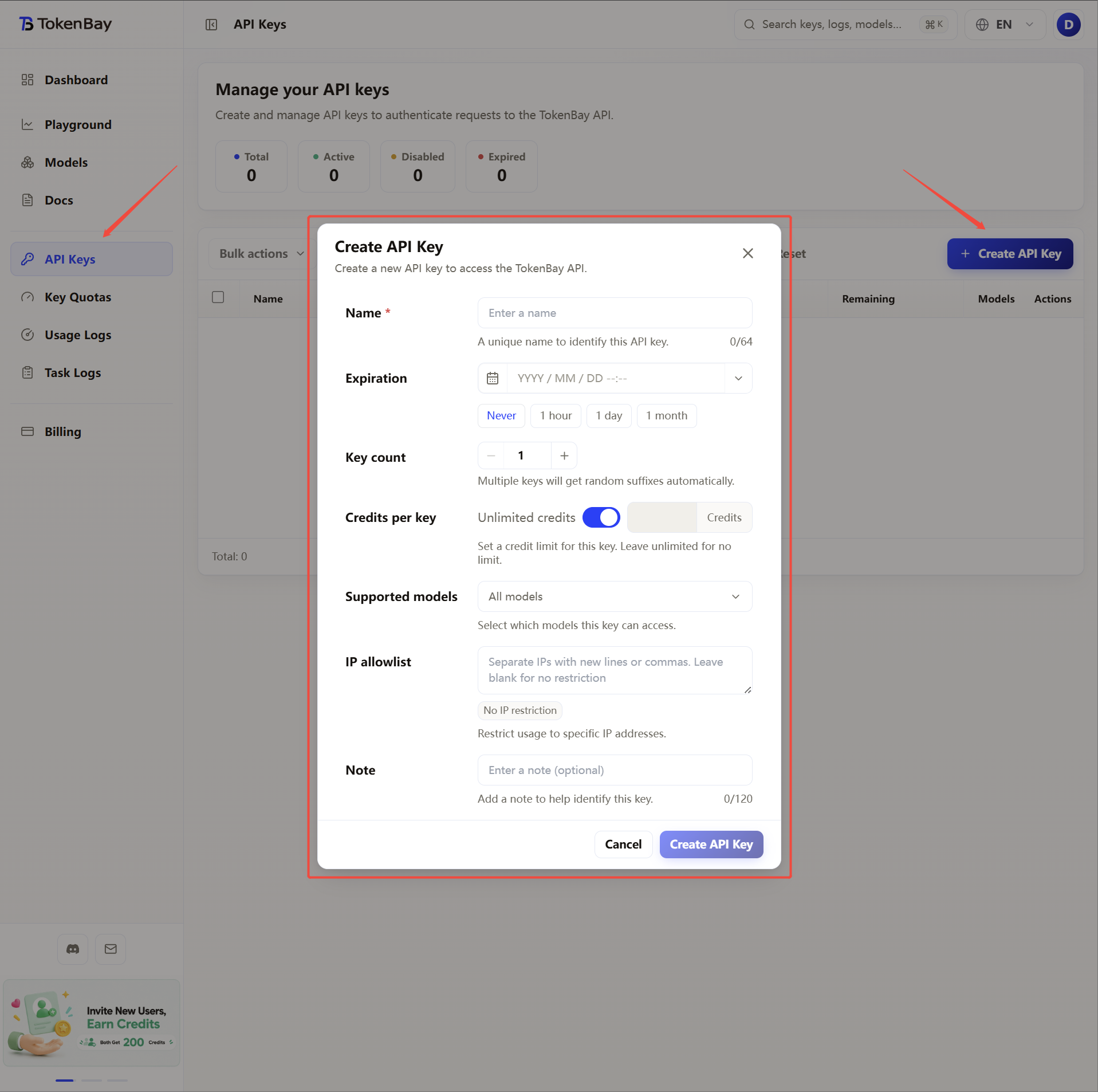
Log in to the TokenBay console → API keys → Create key. Copy the full string starting with sk-. The plain text shows only once and can’t be viewed again after you leave the page.
2. Configure the API key (write to .env)
Hermes reads the credential from the variable name specified by key_env; below we consistently use TOKENBAY_API_KEY. Write it into ~/.hermes/.env:
| Variable | Value |
|---|---|
TOKENBAY_API_KEY | Your TokenBay API key (sk-...) |
You can write it directly with hermes config set (the API key is automatically routed to .env):
hermes config set TOKENBAY_API_KEY sk-XXXXXXXOr edit ~/.hermes/.env manually:
# ~/.hermes/.env
TOKENBAY_API_KEY=sk-XXXXXXX
3. Configure the provider (interactive, recommended)
After exiting any session, run the configuration wizard in your terminal:
hermes modelIn the menu, choose Custom endpoint (self-hosted / VLLM / etc.) and fill in the prompts in order:
| Prompt | Value |
|---|---|
| API base URL | https://api.tokenbay.com/v1 |
| API key | Your TokenBay API key (sk-...) |
| Model name | claude-sonnet-4.6 (or any recommended model ID below) |
| API mode | chat_completions |
The wizard persists the result to ~/.hermes/config.yaml.
4. Alternative: write to config.yaml manually
If you’d rather not use the wizard, you can edit ~/.hermes/config.yaml directly and register TokenBay as a “named custom provider”:
# ~/.hermes/config.yaml
custom_providers:
  - name: tokenbay
    base_url: https://api.tokenbay.com/v1
    key_env: TOKENBAY_API_KEY
    api_mode: chat_completions

model:
  default: claude-sonnet-4.6
  provider: custom:tokenbay
Field reference:
| Field | Meaning |
|---|---|
name | The provider name, referenced as custom:tokenbay |
base_url | The root of TokenBay’s OpenAI-compatible endpoint (including /v1) |
key_env | The name of the environment variable holding the API key (corresponds to TOKENBAY_API_KEY in .env) |
api_mode | The protocol type; TokenBay uses chat_completions |
model.default | The default model ID |
model.provider | The active provider, which must match the name above (custom:<name>) |
Configuration hierarchy:
config.yamlis the single source of truth for model/endpoint configuration. Command-line arguments (such ashermes chat --model ...) have the highest priority and apply only to a single invocation; next comesconfig.yaml; secrets fall back to.env.
5. Recommended models
Hermes is a long-horizon autonomous agent, so we recommend models that excel at tool calling and long context:
| Use case | Model ID |
|---|---|
| Autonomous agent / long tasks (recommended default) | claude-sonnet-4.6 |
| Strongest reasoning / heavy coding | claude-opus-4.8 |
| Cost-effective / lightweight subagents | claude-haiku-4.5 |
Model IDs are passed straight through to the upstream with no prefix. See the full list at Models, or refer to the console Models page; before connecting, verify and confirm that your group is authorized for the model.
Model name format: In TokenBay model names, the version number only accepts the dotted form (e.g.
claude-sonnet-4.6) — don’t write it with hyphens (claude-sonnet-4-6).
6. Advanced configuration: long-task timeouts
Autonomous agents often run long tasks. Hermes’s request timeout is already fairly generous by default (HERMES_API_TIMEOUT defaults to 1800 seconds / 30 minutes) and generally doesn’t need adjusting; if you need to override it explicitly, set the legacy environment variables in .env (in seconds):
# ~/.hermes/.env
TOKENBAY_API_KEY=sk-XXXXXXX
HERMES_API_TIMEOUT=1800
HERMES_API_CALL_STALE_TIMEOUT=300| Variable | Meaning | Official default |
|---|---|---|
HERMES_API_TIMEOUT | Timeout ceiling for a single request (socket read) | 1800 (seconds) |
HERMES_API_CALL_STALE_TIMEOUT | Ceiling for declaring a non-streaming call “unresponsive” | 300 (seconds) |
Prefer provider-granular settings in
config.yaml: Hermes now supportsproviders.<id>.request_timeout_seconds(ortimeout_seconds) andproviders.<id>.stale_timeout_seconds, which take priority over the legacy environment variables above; you can also override them per-model undermodels.<model>. For the exact syntax, defer to the official Configuration docs.