
LobeChat
- Homepage: lobehub.com
- Install / self-hosting docs: Build Your Own LobeHub
- Model provider environment variables: Model Service Providers
- GitHub: github.com/lobehub/lobe-chat
- Protocol: OpenAI-compatible (connected to TokenBay via the built-in OpenAI provider)
Install
LobeChat offers several ways to run it; pick whichever suits you — the steps to connect TokenBay are identical. For everything else, defer to the official docs.
Option 1: Hosted cloud (no deployment)
Just visit lobehub.com, sign up, and use it. Enter your key in the UI at runtime — no installation required.
Option 2: Desktop client
Grab the macOS / Windows / Linux installer from the official download page, and fill in your credentials under Settings inside the app.
Option 3: Docker self-hosting (community edition, lightweight single-node)
docker run -d \
  -p 3210:3210 \
  -e OPENAI_API_KEY=sk-xxxxxx \
  -e OPENAI_PROXY_URL=https://api.tokenbay.com/v1 \
  -e ACCESS_CODE=your-access-code \
  --name lobe-chat \
  lobehub/lobe-chat
When you need multi-user support, login state, file storage, and so on, use the database-backed deployment (image lobehub/lobe-chat-database, which requires an additional Postgres setup).
Version check
- Self-hosted:
docker exec lobe-chat node -e "console.log(require('/app/package.json').version)", or openhttp://<host>:3210in a browser and check the version under Settings → About. - Desktop / hosted: check the version number under Settings → About; if you hit any issue, upgrade to the latest version first.
Connect TokenBay
How it works
LobeChat ships with a built-in OpenAI provider that already speaks the OpenAI-compatible protocol. Connecting TokenBay comes down to pointing that provider’s API proxy address at the TokenBay gateway and filling in your TokenBay API key. The credential is sent with each request as an Authorization: Bearer <key> header, handled automatically by LobeChat. Two configuration paths:
- Self-hosted: pre-set with the environment variables
OPENAI_API_KEY+OPENAI_PROXY_URL(see below). - Hosted / desktop / runtime switching: fill in the Settings → AI Service Provider → OpenAI panel in the UI.
Base URL concatenation rule (must read): LobeChat’s OpenAI provider defaults to
https://api.openai.com/v1and appends/chat/completionswhen making requests. SoOPENAI_PROXY_URL/ the API proxy address should be set to the form that includes/v1:https://api.tokenbay.com/v1— no trailing slash, no/chat/completions.
- The TokenBay gateway root domain is
https://api.tokenbay.com, and the OpenAI endpoint is/v1/chat/completions; because LobeChat only appends/chat/completions, you need to write/v1into the proxy address yourself.- Official tip: if you get an empty message back during testing, the proxy address is most likely missing
/v1— add it and you’re set (see the official Model Service Providers environment variables docs).
1. Get an API key
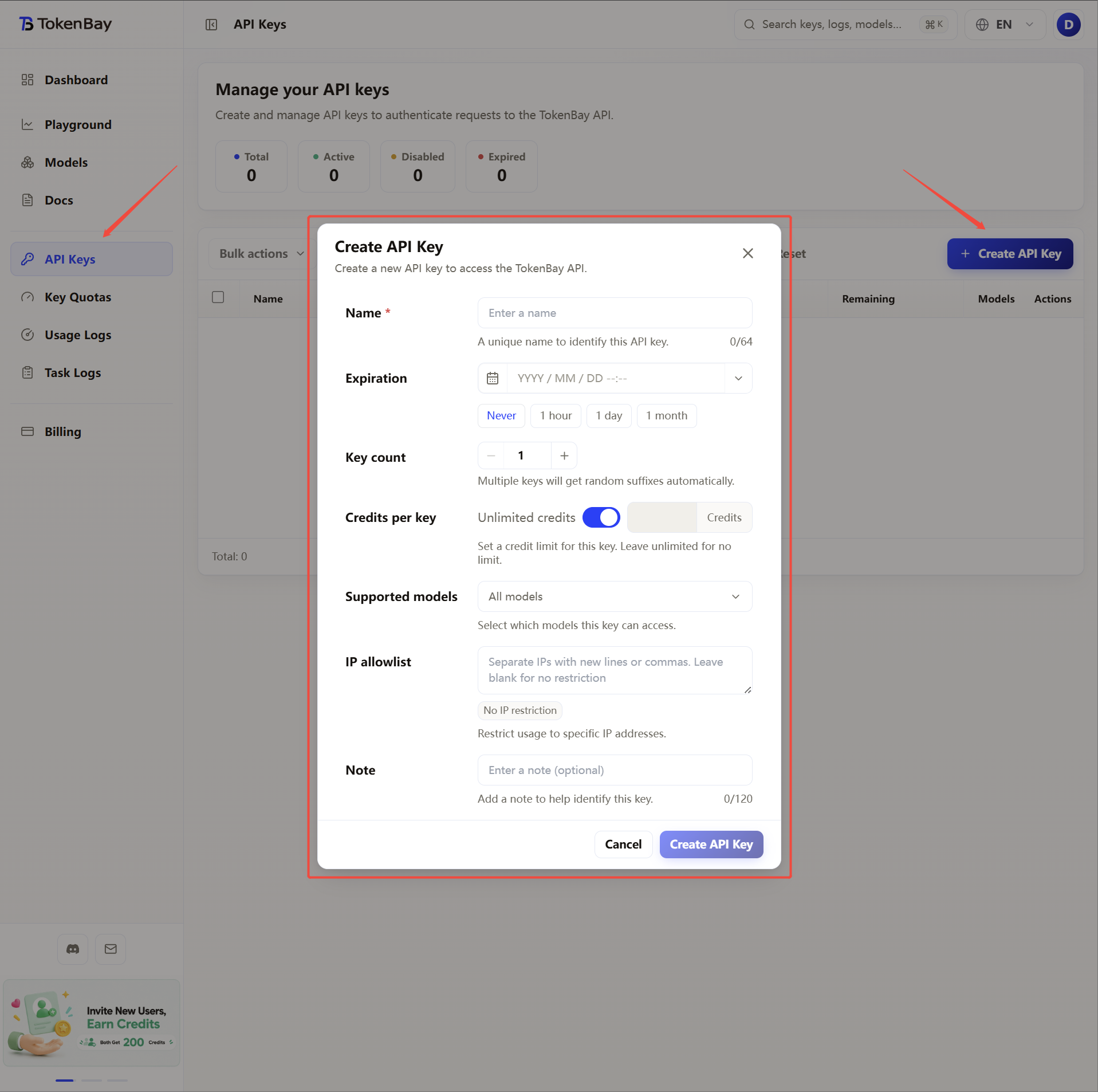
Log in to the TokenBay console → API Keys → Create Key. Copy the full string starting with sk-. The plaintext is shown only once — you cannot view it again after leaving the page.
2. Configure environment variables (self-hosted)
Set these in the -e arguments of docker run or in the environment block of docker-compose.yml:
| Variable | Value |
|---|---|
OPENAI_API_KEY | Your TokenBay API key (sk-...) |
OPENAI_PROXY_URL | https://api.tokenbay.com/v1 |
OPENAI_MODEL_LIST | (optional) controls which models appear in the dropdown; see the recommended models below |
Sample docker-compose.yml snippet:
services:
  lobe-chat:
    image: lobehub/lobe-chat
    ports:
      - "3210:3210"
    environment:
      OPENAI_API_KEY: sk-xxxxxx
      OPENAI_PROXY_URL: https://api.tokenbay.com/v1
      ACCESS_CODE: your-access-code
      OPENAI_MODEL_LIST: "-all,+gpt-5.5,+claude-sonnet-4.6,+gemini-2.5-pro"
How it takes effect: after changing environment variables, you must rebuild the container (docker compose up -d or re-run docker run) for them to apply; changing shell variables on the host has no effect on an already-running container.
3. Alternative: configure in the UI (hosted / desktop / runtime)
Go to Settings (avatar in the bottom-left) → AI Service Provider → OpenAI, turn the provider’s switch on, then fill in:
| Field | Value |
|---|---|
| API Key | Your TokenBay API key (sk-...) |
| API Proxy Address (Proxy URL) | https://api.tokenbay.com/v1 |
| Model list | Manually add the model IDs you want (see below), or click “Fetch model list” to pull and then filter |
Priority: configuration entered in the UI is stored in the database / locally and takes precedence over environment variables. If you set environment variables on a self-hosted instance and also changed things in the UI, the last save in the UI wins; when troubleshooting, re-entering everything in the UI is the most reliable approach.
4. Recommended models
| Use case | Model ID |
|---|---|
| General flagship | gpt-5.5 |
| Primary coding / long context | claude-sonnet-4.6 |
| Complex tasks / long context | claude-opus-4.8 |
| Lightweight / fast response | claude-haiku-4.5 |
| Multimodal / vision | gemini-2.5-pro |
Model IDs are passed straight through to the upstream, with no prefix. For the full list of available models, see the model list or the console Models page.
Model name format: in TokenBay model names, version numbers only accept the dotted form (e.g.
claude-sonnet-4.6,gpt-5.5) — do not write them with hyphens (claude-sonnet-4-6,gpt-5-5).The table above is illustrative; before connecting, verify the exact Model ID in the console and confirm that the group your API key belongs to has been authorized for that model (models that are not enabled must be authorized in the console group settings).
5. Advanced configuration
OPENAI_MODEL_LIST uses + to add, - to hide, and model_id=display name to rename, separated by commas; -all first clears the built-in list, keeping only the models you explicitly enable. You can also declare extended capabilities with <maxToken:capability> — the first item inside the angle brackets must be maxToken (max context), after which you can stack capability flags (such as vision, fc for function calling, reasoning, search, file, imageOutput), colon-separated; the syntax follows the official model list syntax.
Complete docker-compose.yml example (with model list, display names, and vision capability tagging):
services:
  lobe-chat:
    image: lobehub/lobe-chat
    ports:
      - "3210:3210"
    environment:
      OPENAI_API_KEY: sk-xxxxxx
      OPENAI_PROXY_URL: https://api.tokenbay.com/v1
      ACCESS_CODE: your-access-code
      OPENAI_MODEL_LIST: "-all,+gpt-5.5,+claude-sonnet-4.6,+claude-opus-4.8,+gemini-2.5-pro=Gemini 2.5 Pro<1000000:vision:fc>"
LobeChat’s OpenAI provider does not offer a dedicated request-timeout environment variable. When long tasks are interrupted, first check network / proxy connectivity and the upstream model’s concurrency limits.