
OpenCode
- Homepage: opencode.ai
- Install docs: opencode.ai/docs
- Gateway configuration: opencode.ai/docs/providers · opencode.ai/docs/config
- Protocol: OpenAI Chat Completions (via
@ai-sdk/openai-compatible, endpoint/v1/chat/completions)
Install
The official docs recommend the install script, with package-manager options also available. For anything else, defer to the official install docs.
Install script (recommended, macOS / Linux / WSL)
curl -fsSL https://opencode.ai/install | bashNode.js package managers (pick one)
npm install -g opencode-ai
pnpm install -g opencode-ai
bun install -g opencode-ai
yarn global add opencode-ai
Homebrew (macOS / Linux)
brew install anomalyco/tap/opencodeWindows
The official docs recommend installing inside WSL using the macOS / Linux method; you can also use a package manager:
choco install opencode
scoop install opencode
npm install -g opencode-ai
After install, verify with opencode --version.
Connect TokenBay
By default OpenCode uses built-in providers such as OpenCode Zen. To route through TokenBay instead, you need to register a custom provider in the config file opencode.json:
npmuses@ai-sdk/openai-compatible, indicating the standard Chat Completions protocol;options.baseURLpoints at the TokenBay gateway;- credentials can be written in
options.apiKey(the{env:VARIABLE_NAME}syntax lets you reference an environment variable), or stored in OpenCode’s credential store via the/connectcommand; modelslists the available models, and their key names must match the TokenBay model IDs exactly — otherwise they won’t show up in the model picker.
Base URL note:
@ai-sdk/openai-compatibleappends/chat/completionstobaseURL. SobaseURLmust be written ashttps://api.tokenbay.com/v1(with/v1), not the barehttps://api.tokenbay.com, or you’ll get a 404.
1. Get an API key
Log in to the TokenBay console → API keys → Create key. Copy the full string starting with sk-. The plain text shows only once and can’t be viewed again after you leave the page.
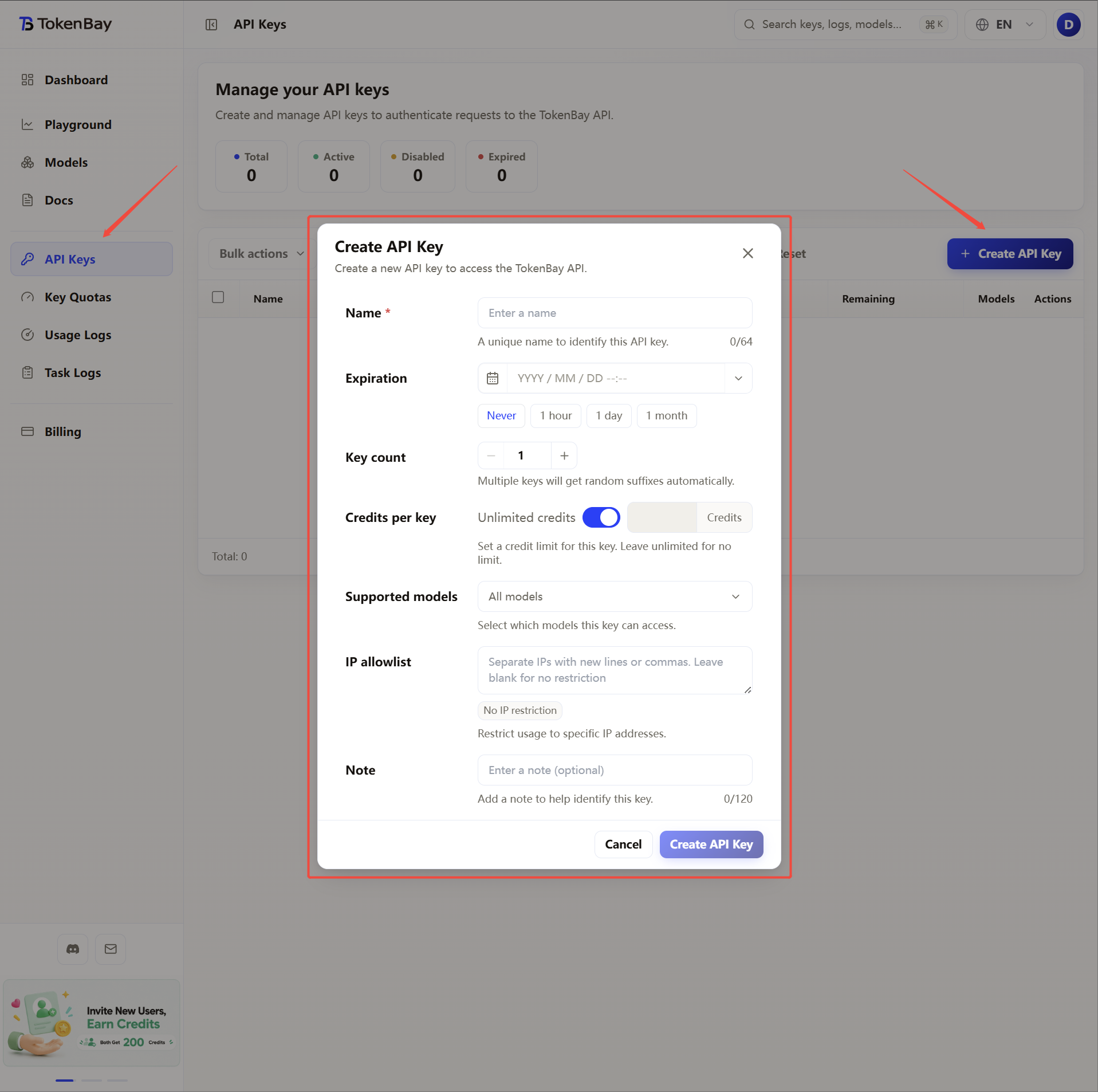
2. Configure environment variables
We recommend storing the credential in an environment variable and referencing it in the config file via {env:TOKENBAY_API_KEY}, to avoid writing the key in plain text into the config:
| Variable | Value |
|---|---|
TOKENBAY_API_KEY | Your TokenBay API key (sk-...) |
macOS / Linux (zsh or bash)
Append the line below to ~/.zshrc or ~/.bashrc, then run source ~/.zshrc to apply it:
export TOKENBAY_API_KEY="sk-XXXXXXX"Windows (PowerShell, persistent user env)
[Environment]::SetEnvironmentVariable('TOKENBAY_API_KEY','sk-XXXXXXX','User')Windows (CMD)
setx TOKENBAY_API_KEY "sk-XXXXXXX"Both the PowerShell and CMD forms persist the env var at user scope — open a new terminal window before it takes effect.
3. Write the OpenCode config file
OpenCode’s config file has two common locations, with the latter taking higher priority:
| Location | Path | Scope |
|---|---|---|
| User-wide (global) | ~/.config/opencode/opencode.json | Shared across all projects |
| Project-level | opencode.json in the project root | Current project only, overrides the global config |
A project-level
opencode.jsoncan be committed to Git alongside the project, and uses the same schema as the global config. We recommend keeping the common provider configuration in the global file and overriding it with a project-level file only for individual projects.
If the file doesn’t exist, create it and write the following (global config shown as an example):
{
  "$schema": "https://opencode.ai/config.json",
  "provider": {
    "tokenbay": {
      "npm": "@ai-sdk/openai-compatible",
      "name": "TokenBay",
      "options": {
        "baseURL": "https://api.tokenbay.com/v1",
        "apiKey": "{env:TOKENBAY_API_KEY}"
      },
      "models": {
        "claude-sonnet-4.6": { "name": "Claude Sonnet 4.6" },
        "claude-opus-4.8": { "name": "Claude Opus 4.8" },
        "claude-haiku-4.5": { "name": "Claude Haiku 4.5" },
        "gpt-5.3-codex": { "name": "GPT-5.3 Codex" }
      }
    }
  },
  "model": "tokenbay/claude-sonnet-4.6"
}
Field reference:
| Field | Meaning |
|---|---|
provider.tokenbay | The provider ID; can be customized, and is used as a prefix when selecting a model below |
npm | The AI SDK adapter package; use @ai-sdk/openai-compatible for OpenAI-compatible interfaces |
options.baseURL | The root of TokenBay’s OpenAI-compatible endpoint (including /v1) |
options.apiKey | The API key; reference the environment variable with {env:TOKENBAY_API_KEY} |
models | The list of available models; key names must match the TokenBay model IDs exactly |
model (top level) | The default model, in the format provider_id/model_id, i.e. tokenbay/claude-sonnet-4.6 |
Alternative: store the credential with
/connect. If you’d rather not use an environment variable, run/connectin OpenCode’s TUI, choose Other from the dropdown, enter the provider IDtokenbay, then paste the API key. The credential is stored in~/.local/share/opencode/auth.json, and you can then omit theoptions.apiKeyabove — but thebaseURLandmodelsunderprovider.tokenbaystill need to be defined in the config file.
4. Recommended models
| Use case | Model ID |
|---|---|
| Everyday coding / tool calling (recommended) | claude-sonnet-4.6 |
| Complex reasoning / long-task flagship | claude-opus-4.8 |
| Cost-effective / lightweight | claude-haiku-4.5 |
| OpenAI-family coding | gpt-5.3-codex |
Model IDs are passed straight through to the upstream with no prefix. When selecting a model in OpenCode you need to include the provider prefix, i.e. tokenbay/claude-sonnet-4.6.
Model name format: in TokenBay model names, the version number only accepts the dotted form (e.g.
claude-sonnet-4.6) — don’t write it with hyphens (claude-sonnet-4-6).The table above is an example; for the exact model IDs, modalities, and endpoints, defer to the console Models page (or the model list). Before connecting, verify the values and confirm your group is authorized for the model.
5. Advanced configuration
Complex reasoning or long-context tasks take a while, and the default timeout may cut requests off. OpenCode offers timeout options such as timeout and chunkTimeout under the provider’s options; you can also declare each model’s context/output limits (limit) so that OpenCode displays the remaining context correctly, and pass custom request headers through with headers:
{
  "$schema": "https://opencode.ai/config.json",
  "provider": {
    "tokenbay": {
      "npm": "@ai-sdk/openai-compatible",
      "name": "TokenBay",
      "options": {
        "baseURL": "https://api.tokenbay.com/v1",
        "apiKey": "{env:TOKENBAY_API_KEY}",
        "timeout": 600000,
        "chunkTimeout": 30000
      },
      "models": {
        "claude-sonnet-4.6": {
          "name": "Claude Sonnet 4.6",
          "limit": { "context": 200000, "output": 64000 }
        }
      }
    }
  },
  "model": "tokenbay/claude-sonnet-4.6"
}| Field | Meaning |
|---|---|
options.timeout | Per-request timeout (milliseconds), default 300000; set to false to disable. For long tasks, raise it, e.g. 600000 (about 10 minutes) |
options.chunkTimeout | The timeout (milliseconds) between adjacent chunks of a streaming response; if no new chunk arrives before it elapses, the request is aborted |
options.headers | Custom request headers sent with every request (optional) |
models.<id>.limit.context | The maximum number of input tokens the model can accept |
models.<id>.limit.output | The maximum number of tokens the model can generate in a single response |
The values in
limitare examples; defer to the context/output limits noted for each model on the console Models page.